Overpayment refund report
Go to: Home > Displays, Data Preps, Reports > Claims Adjustments > Refund Report
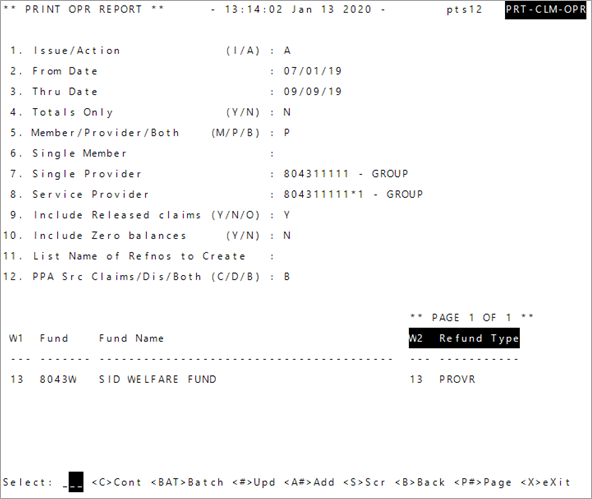
- Enter either
IorAto set the report dates byI—issue date orA—action date. - Enter the
From Datefor the report. - Enter the
Thru Datefor the report. - At
Totals Only:Type
Y-yes to have the report show only the balances.OR
- Type
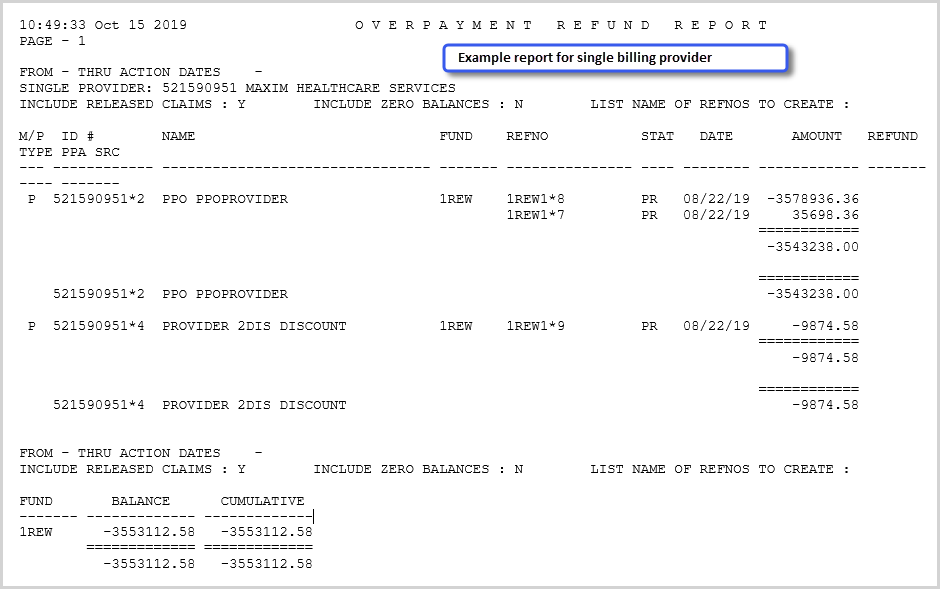
N-no to show all transactions and the balances. The report will show each payee with transactions. The reference numbers, status codes, dates and amounts will show as well. Amounts overpaid to payees are represented as negatives, recovered monies are positives.
-
Enter the payees to include:
M—members only,P—providers only, orB—include members and providers.Note: To track payments at the service provider, a system administration configuration (SAC) needs to be set to take the overpayment at the service provider and not the billing provider. Ideally when using this option, the billing provider shouldn’t have overpayments. Contact your Bridgeway representative to set or change SAC (System Administration Control) settings. Don't change SACs without first consulting Bridgeway as changing them can affect other functions and global system settings. To apply overpayments at the billing provider level for only specific billing providers, see Update billing provider details, comments, and alerts - Next, if you want to report on a single member or provider:
- If you selected
M, and want to report on aSingle Memberenter the member’s social security number.
- If you selected
P, and want to report on a specific billing provider enter the billing provider’s ID number inSingle Provider. If you selected
P, and want to report on a specific service provider, enter the service provider’s ID number inService Provider.OR
- Press
Enterto leave the field blank.
- If you selected
- To include overpayments that have resolved to a zero balance, enter
Y, or enterNto not include them. -
At
Include Released Claims, typeYto include released claims,Nto not report released claims, orOto only report released claims (this will include zero balances). - To create a list of claim refnos once the report runs, enter a name for the list at
List Name of Refnos to Createor pressEnterto leave blank. - Determine if the report will include PPA
 A way to recover a previous overpayment by deducting the amount from a check issued to the same payee until the overpayment is recovered. This reduction has no impact on the benefit of a claim; the impact is on the amount of the check. amounts for: type
 Dfor disability,Cfor claims, orBto include both claims and disability prior payments. -
Press
Enter. If needed add aFundand theRefund Type(the overpayment refund type) to report.Note: To add overpayment refund types go toCodes and Criteria>>Claims Processing>>Refund Types. -
At
Include Released Claims, typeYto include released claims,Nto not report released claims, orOto only report released claims (this will include zero balances). -
Enter
Cat theSelectline to process the report. This process generates a physical print job per payee that is sent to the spooler. If the report is run for only one payee type, only one print job will be delivered to the spooler. See Print queue—Retrieve a print job.