Add, update or delete correspondence participants
The steps below are performed in Correspondence Participants (on the Home session menu under the Codes and Criteria menu, Correspondence area).
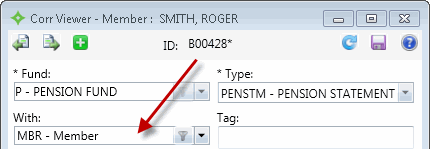
Participants identify the person the operator interacted with, such as a member, dependent, employer, etc. The correspondence participants added display in the Correspondence Viewer With list.
Add a correspondence participant
PressEnter to move through the fields or after typing a command at the Select line.- In the
Codefield, type a new correspondence participant code. - If you don't know the code, type
ALLand then the sequence number for the code you want. - In the
Descriptionfield, type a description of the code. - At the Select line, type
Fto file the changes.
Update a correspondence participant
PressEnter to move through the fields or after typing a command at the Select line.- In the
Codefield, type the code you want to update. - At the Select line, type
1and then type a new description in the field. - At the Select line, type
Fto file the changes.
Delete a correspondence participant
PressEnter to move through the fields or after typing a command at the Select line.- In the
Codefield, type the code you want to delete. - At the Select line, type
Dto delete the item. - At the message, type
Yto confirm the action.
 Correspondence Participant field descriptions
| Field | Description |
|---|---|
| Code | A code that identifies the type of person who initiated the communication. This code can be anything you want it to be. Some examples are: MEM or MBR for a member or EMP for an employer. |
| Description | A description of the code, such as, the type of person the code represents. For example, for the code MEM, the description is Member. |