Add or update frequency codes
Agreement ∞ Agreement link ∞ Agreement link status codes ∞ Frequency codes
Navigate to the frequency code menu
Go to: Home > Codes and Criteria > Contributions Employers > Employer Frequency Codes
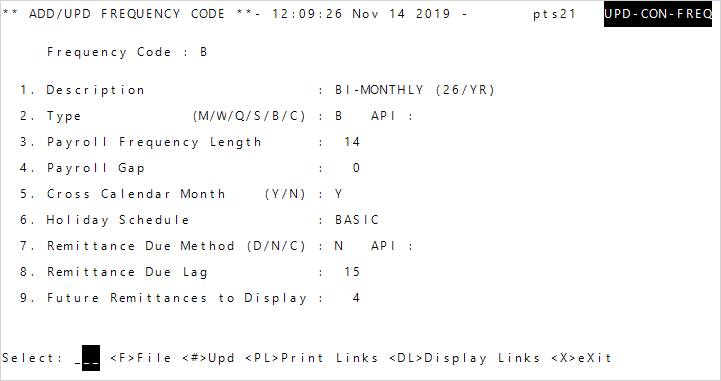
 Frequency code field descriptions
| Option | Description |
|---|---|
| Description | Description of the frequency code. |
| Type (M/Q/Q/S/B) |
How often the employer will remit contributions.
|
| Payroll Frequency Length | Applies only to weekly, semi-monthly,
and biweekly frequency types. The payroll period length (for example,M for monthly, a 30 might be entered, or for weekly, a 5 might be appropriate). |
| Payroll Gap | Applies only to weekly, semi-monthly, and biweekly frequency typesThe number of days between the end of one payroll period and the beginning of the next. For example, a gap of two days between five-day work weeks. |
| Cross Calendar Month (Y/N) |
Applies only to weekly, semi-monthly, and biweekly frequency types. Determine if payroll periods can cross calendar months. The last week of the payroll period will be adjusted to be shorter or longer if the period crosses the calendar month.
|
| Holiday Schedule | The holiday schedule that defines valid
remittance due dates. If you don't know what code to choose, enter ALL to display a list of all available options to choose from. Then, enter the code's sequence number.Note: If you change the holiday schedule, remittance due records for agreements linked to this frequency code will be deleted and recreated. Only due records that don't have remittances are affected. |
| Remittance Due Method (D/N) |
The remittance due date calculation method.
|
| Remittance Due Lag |
The number value to determine the remittance due date in conjunction with the
|
| Future Remittances to Display |
Determine how many remittance due records beyond the current date display in the employer portal. If this is left blank, one due record beyond the current date will display. Set this value as far into the future to create remittances. For example, for monthly remittances, if you will want to create remittances a year ahead, set this to |
Add a frequency code
- Enter the new
Frequency Codename. EnterYto the Create? message. -
Enter the necessary frequency code information for the employer.
- When you’re done adding the frequency code details, enter
Fat the select line to save the code.
Update frequency codes
- Enter the
Frequency Codeto update. -
Enter the sequence number to edit.
Field description
Option Description Description Description of the frequency code. Type (M/Q/Q/S/B) How often the employer will remit contributions.
W—WeeklyM—MonthlyQ—QuarterlyS—Semi-monthlyB—Bi-weekly
Payroll Frequency Length Applies only to weekly, semi-monthly, and biweekly frequency types. The payroll period length (for example, Mfor monthly, a30might be entered, or for weekly, a5might be appropriate).Payroll Gap Applies only to weekly, semi-monthly, and biweekly frequency typesThe number of days between the end of one payroll period and the beginning of the next. For example, a gap of two days between five-day work weeks. Cross Calendar Month (Y/N) Applies only to weekly, semi-monthly, and biweekly frequency types. Determine if payroll periods can cross calendar months. The last week of the payroll period will be adjusted to be shorter or longer if the period crosses the calendar month.
Y—Yes, payroll periods can cross calendar months.N—No, payroll periods can't cross calendar months.
Holiday Schedule The holiday schedule that defines valid remittance due dates. If you don't know what code to choose, enter ALLto display a list of all available options to choose from. Then, enter the code's sequence number.Note: If you change the holiday schedule, remittance due records for agreements linked to this frequency code will be deleted and recreated. Only due records that don't have remittances are affected.
Remittance Due Method (D/N) The remittance due date calculation method.
D—Indicates the payroll period due date is a specific day of the month following the payroll thru date when payroll period due date is. The day of the month is set atRemittance Due Lag.N—Indicates that the payroll period due date is a number of days after the payroll thru date. The number of days is set atRemittance Due Lag.
Remittance Due Lag The number value to determine the remittance due date in conjunction with the
Remittance Due Method.DRemittance Due Method day—The day of the month the remittance is due.NRemittance Due Method number of days—The number of days after the payroll period thru date that the remittance will be due.
Future Remittances to Display Determine how many remittance due records beyond the current date display in the employer portal. If this is left blank, one due record beyond the current date will display.
Set this value as far into the future to create remittances. For example, for monthly remittances, if you will want to create remittances a year ahead, set this to
12.12 future remittances will display in the employer portal. - Edit the row(s), then press
Enterto return to the select line. - Enter
Fat the select line to save.